Tuesday, November 17, 2009

Levels of Website Interactivity

Whenever I mention website interactivity, I often see people around me wonder what is website interactivity? Making a website interesting and engaging, interests users and causes them to spend more time on the site. It’s all about enriching user experience. Any website, that presents content in an interactive way will tend to hold user attention. However, over the years, I have noticed the many levels of website interactivity. These levels may have been known to us but we have probably never noticed the gradual change in website design.

I have tried to categorize the interactivities in various levels and cited them with few examples.

Level 1: Using Basic HTML effects


This was the basics of the phenomenal change that we see today. At level 1, I aptly put in examples of websites that include the basic things such as color change for roll over or tool tips that appear for different sections. Websites used revolving text, banners that moved around; images that had some effect such as blinking images, pop ups to share additional information etc. The example given above shows a neat designed popup to show additional information once the cursor hovers above a particular image

Level 2: Displaying Information Through Creative Ways


The websites that belong to the level 2 category had some more amount of interactivity. By now, websites had some new ways to improve presentation of the information. New Technologies like AJAX are used creatively to attract users. For example, by holding the cursor over the heading, an area can be enlarged based on user action. This presents more information on the page without diverting the user to another page. Also, this keeps a user focused on the required information instead of displaying complete information in one go. The example above shows how certain headings are highlighted and linked in grey so that users can access information easily whilst browsing the site.

Level 3: Flash Animations and Videos


Level 3 websites witnessed a further change. Web designers used flash animations and photo sliders to present content in an engaging way. This brought about a livelier change in websites. In the above example, the website deals with accessories and clothing for those who love to skate or surf. There is a very ingenious use of a skating video on the website with the use of flash to engage users.

Level 4: Interactions Based on User Inputs

By now, websites had a higher level of interactivity. As compared to flash interactions in the previous levels which displayed the information, the interactivities now invited users to click for interesting inputs. In the above example, the website ensures that users interact and provide inputs related to the product ensuring users are kept on the page. Interesting surveys about coffee preferences support the subject making the website a success with users.

Level 5: 3D Interactivity


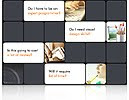
This level is about the highest levels of interactivity for website design. Here, the focus is on the use of 3Dimensional interactivities for websites. The incorporation of 3Dimensional elements to present content has seen many creative forms. In the example above, there is a use of 3Dimensional forms to present the matter. The website is built upon the concept of implementing the power of visuals! Apart from this, websites that use 3D cubes, panning cards, 3D flip books, interactive site maps etc, all belong to this level 5.

I am sure these levels are the stepping stone for website interactivity. Web designers have more scope in terms of creativity and I am certainly looking forward to many such creative canvasses!

Tuesday, November 3, 2009

Target View Size: Mistaken Identity!


Sometimes I'm confused by what I think is really obvious. But what I think is really obvious obviously isn't obvious...

- Michael Stipe

You might be thinking deeply about this statement or might be…well, plain confused. It does happen that the obvious is not actually obvious! There should be no confusion about this statement. As I know that everyone often fails to see the obvious in life.

These words have flowed from my mind for a reason. It was just another sunny day and I read yet another mail that brought with it the same confusion. No, I am no agony aunt out here; I meant it was related to the product - Raptivity Web Expert. Similar kinds of mails over a couple of days prompted me to put my thoughts into words. The common thread was all about an option provided in Raptivity Web Expert. I am talking about ‘Target View Size’.

The Target View Size panel is used to view the interactivity in the required height and width in pixels. When a user makes a change in either of the two, the other is calculated automatically. This is particularly useful to preview the interactivity in a given size. This does not affect the actual size of the interactivity output.

If you require the interactivity to fit into a defined space on your web page, you can make use of this option to preview the interactivity. The Target View Size panel helps you to view how the interactivity will appear in a given size. As correctly labeled, it is “Target View Size” and not “Target Size. The difference in both is that the former is meant only for preview and the latter is about a change in the actual size.

A simple option for a solution…but then, not all things can be really simple! At our end, we will definitely try to make things easier for you! In the meantime, suggestions are welcome…

Tuesday, October 20, 2009

Trick or Treat?!

It’s October and we all know the kind of celebrations that the month brings in! It’s the time to plan parties and gear up for a lot of celebrations.

It’s no wonder that I am in a festive mood myself. Maybe, that’s why I have decided this week, to keep my blog in the celebration mode as well! October is the time for Halloween celebrations, there is so much to be done right from planning the party themes to all the activities. I am sure many of you are looking to find the right party ideas for your Halloween celebrations. There are many who even prefer to hire professionals for the perfect touch. Even then, there are ways to go about planning the celebrations with creative imagination. I have some interesting thoughts which I would like to share with you on this note. Get into the right Halloween mood with some of these creative ideas displayed in the 3D cube!


The 3Dimensional cube is created with Raptivity Web Expert

Tuesday, October 6, 2009

Interactivity: An Important Ingredient in Web Design

Creativity should flow effortlessly. This applies to all facets of creative design. When creative ideas are implemented with great ease, the result lies in effortless and attractive design. Website design offers many such avenues for designers to discover their creativity especially with the use of Rapid Interactivity, a new phenomenon.

A basic problem that is seen in website design is the lack of time or knowledge of different packages that is required to create a good website layout. I have seen creative web designers who are unable to translate their ideas into the website. If we search the Internet today, we can find numerous ways through which one can have an attractive website without the need to know complex things about design!

Let us study some simple examples that can give an idea how certain subjects can be presented in an interesting way for users, with the use of a 3Dimensional cube. Give a thought and you will understand how a product feature can be presented in an interesting way. The most common way would be to have a catalogue style or rows of photographs that display the product. This may not necessarily interest users. Take a look at the 3Dimensional cube below to know how it can be used differently for various websites that deal in diverse topics.

This example shows how a 3Dimensional cube can present various angles of a mobile phone. The cube engages the user while presenting information about the product.


A travel website can look interesting when a 3Dimensional cube is used to present the top destinations. This 3Dimensional cube showcases some popular destinations in London.


A movie review site or one that is related to showing the listings can use this cube to present the top movies of 2009! This breaks away the usual trend of listing movies in a tabular format.


Tuesday, September 22, 2009

Presentation is the Key!

Have you ever wondered why you have purchased that particular outfit from a specific branded store? I am sure it happens to all of us that we remain loyal to certain brands, sometimes not only due to the product quality but other factors attached to it. Apart from the product quality, one more factor that captures our attention lies in the way the product is packaged and presented to us.

Reflect upon simple things such as why the name Levis springs up to the mind when you think of denims. This brand name has been leading for years. There is a strong strategy that makes these names the most sought-after in the market.

Presentation is the keyword when it comes to the promotion of any product. The presentation extends not only to the way the advertising campaigns are planned; even the minutest details are planned with perfection.

A big brand or one that is trying to capture a new audience should always remember that the way an idea or message is presented can make a huge difference. This planning extends even to the online media.

A website can be used in many ways to capture loyal users. For this, it is required a website attracts attention and engages the prospective consumers. It should be designed in such a way that ensures the consumer is attracted to view the website in turn learning more about the company or product. A consumer should feel the pleasure while visiting the website.

A concept such as a Flip Book can be used to make a website look stunning! A Flip Book helps to present information, engaging the user at the same time!

View these examples to see how effectively an idea was conveyed to the user in an interactive manner!


A website designed in the form of Flip book to engage a user.
http://www.datafisher.com/en/

View a product demo of Nokia mobiles in the form of Flip Book
http://www.clockworxdesign.com/website_examples/bespoke/nokia/

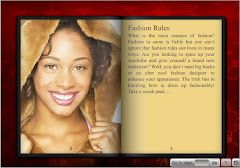
This fashion Flip Book gives important tips in a very unique and engaging way!


See how a website related to beauty and grooming can use a Flip Book in a very creative way!


Scenarios to use Flip book are enormous. Wear your creativity hat and start thinking how and where can YOU use this flip book!

It’s not always that one has to spend hours in programming to create such Flip Books and designs. Such a Flip Book can also be created with ease with the use of Raptivity Web Expert. Check out the Free Trial to know more!